feature ·
Hinode 3: set up once, run on any GPU
A workspace for your setup, machines for the heavy work, and jobs that run while you sleep. Everything in Hinode 3, with a demo of each.
Hinode 3 turns one cloud computer into a workspace and the GPUs you run from it. You set up once, pick the card each job needs, and stop paying when the work stops.
It shipped on September 11 and has had a release every day or two since. This is all of it in one place, with a live demo of each part. Everything here works today in the apps for macOS, Windows and Linux, in Chrome and Edge, and from the hinode command.
1. One workspace for your setup
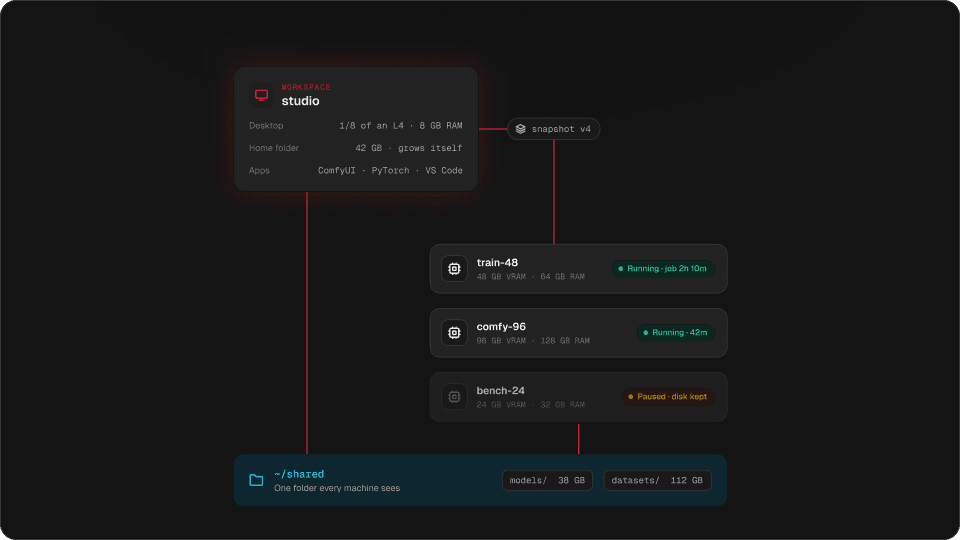
Your workspace is a small Linux computer with a desktop and an address that does not change. You install ComfyUI, your Python environment and your custom nodes there once, and save a snapshot. One workspace, many machines has the details.
2. GPU machines from 24 to 96 GB of VRAM
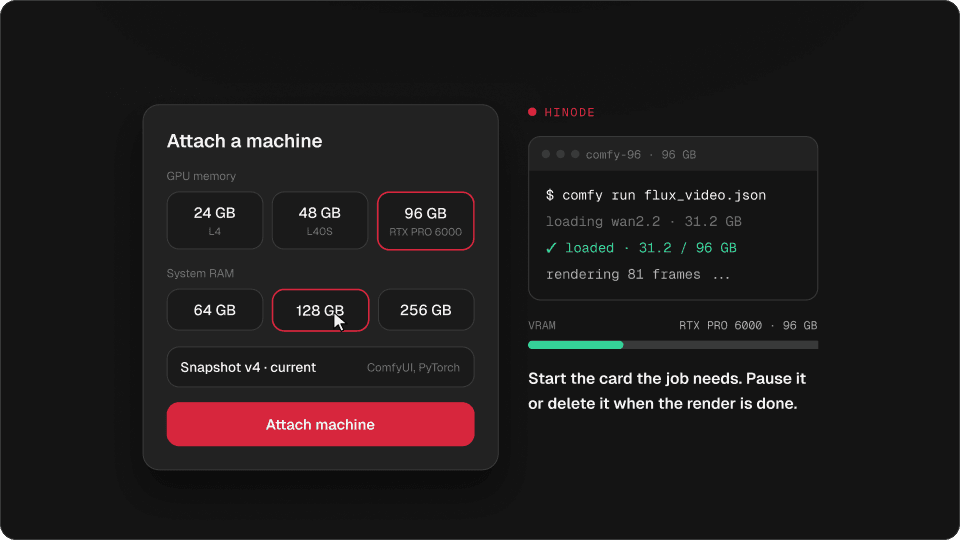
When the work needs a whole card, attach a machine: an NVIDIA L4 with 24 GB, an L40S with 48 GB, or an RTX PRO 6000 with 96 GB, each with 32 to 256 GB of RAM. One card per machine, and nothing else runs on it. Pick the card the model needs.
Try it
Find the smallest size that fits
24 GB VRAM
—
not offered
—
not offered
—
not offered
—
not offered
48 GB VRAM
—
not offered
—
not offered
—
not offered
—
not offered
96 GB VRAM
—
not offered
—
not offered
—
not offered
—
not offered
$ hinode run --size 48x64 "python render.py"Move the sliders to what your model needs. The smallest size that fits lights up.
3. Apps in one click
ComfyUI, PyTorch, JupyterLab, Ollama, vLLM, the AI Toolkit, Axolotl and more install from the workspace screen, with what they depend on. Install ComfyUI in one click.
Try it
Pick apps and install them
Pick a few apps. What an app needs comes with it, and a second install waits its turn.
4. Snapshots
A snapshot saves what is installed on your workspace. Every new machine starts from the newest one, the five newest are kept, and you can start a machine from an older one when a new node breaks a workflow. A running machine is never changed underneath you.
Try it
Five versions are kept
- v2removed
- v3kept
- v4kept
- v5kept
- v6kept
- v7newest
started from v7
6. Jobs that run while you sleep
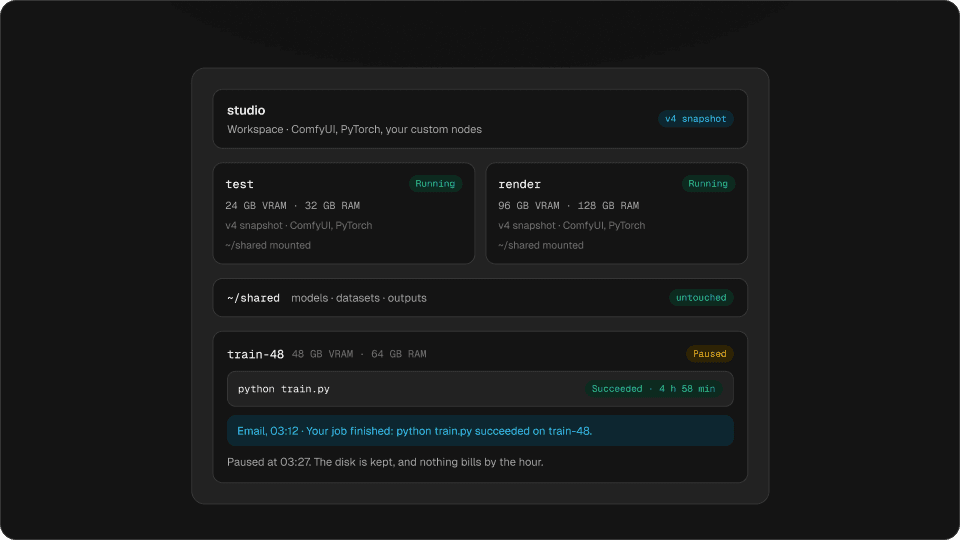
hinode run hands a command to a machine. Close the laptop: you get an email when it ends, the end of the log is kept, and the machine pauses itself. Start a training run and go to bed.
Try it
Drag through the night
03:12 · Your job finished: python train.py succeeded on train-48.
Paused at 03:27. The disk is kept, and nothing bills by the hour.
Drag through the night. The machine stops billing fifteen minutes after the job ends.
7. Machines that pause themselves
After 15 minutes with nothing going on, a machine pauses and keeps its disk. A running job, even a quiet one, counts as work. Idle machines pause themselves.
Try it
Is this machine working?
Busy: the GPU is working
15 min until it pauses itself
Turn things on and off. Anything that is really working keeps the machine awake.
8. Claude, ChatGPT and your terminal
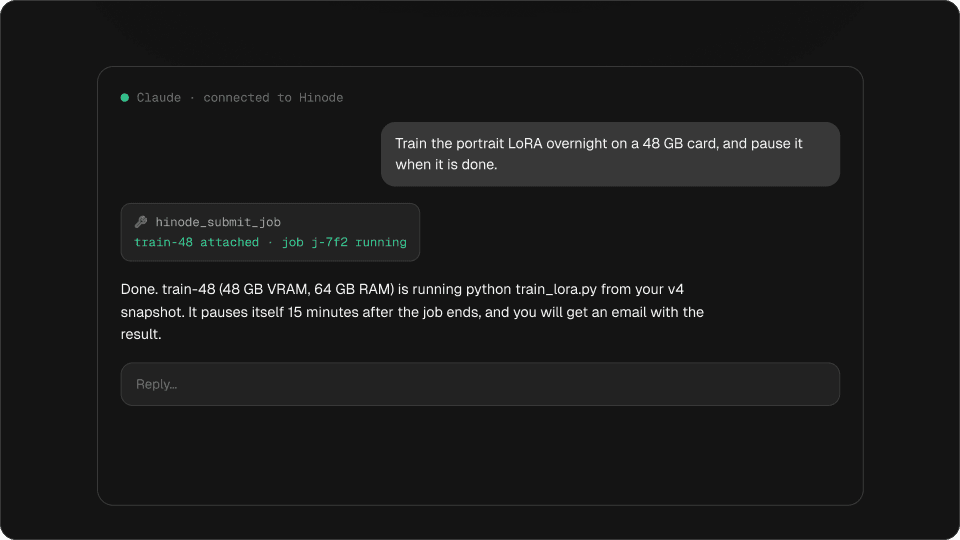
Add Hinode to Claude from its connector directory, or connect ChatGPT, Claude Code and Codex, and ask for what you need in plain words. Ask Claude to start the run.
Try it
Ask Claude something
Claude · connected to Hinode
Train the portrait LoRA overnight on a 48 GB card, and pause it when it is done.
hinode_submit_job
train-48 attached · job j-7f2 running
Done. train-48 (48 GB VRAM, 64 GB RAM) is running python train_lora.py from your v4 snapshot. It pauses itself 15 minutes after the job ends, and you will get an email with the result.
Pick a question. Every answer is read from your account at the moment Claude replies.
Everything else works the way a server does. Stream the desktop from the app or a browser tab. Run hinode ssh setup once, then ssh studio. Open VS Code over SSH, open ComfyUI in your own browser with hinode open, and drag files into your workspace from Finder or Explorer.
9. A bill you can read
There is no plan and no allowance. The workspace and each machine bill for the hours they run. Disks bill for what is written on them, with no size to pick, and the shared folder by the gigabyte. A monthly budget emails you as you get close and stops nothing. Pricing has every rate.
September so far
$98.86
- studio · workspace · 64 h$19.01
- comfy-96 · 96 GB machine · 3 h 10 m$30.27
- train-48 · 48 GB machine · 3 h 04 m$12.14
- Disks · 96 GB written$14.40
- Shared folder · 156 GB$21.84
- Traffic out · 12 GB$1.20
bench-24 pauses in 2 minutes
Nobody has touched it for 13 minutes. After 15, it pauses and the hourly charge stops. The disk and everything on it stay.
Home folder on comfy-96
grew 128 → 256 GB · no restart
Where to start
Create a workspace, install ComfyUI, save a snapshot and attach a machine. The first hour is mostly downloads, and you can work while they run. Your first hour walks through it.
Questions
What is Hinode?
A Linux desktop with a GPU in the cloud, streamed to your Mac, your PC or a browser tab. You keep your setup in a workspace and start GPU machines from it.
How is Hinode different from RunPod or Vast.ai?
Your setup is not tied to a pod. You install once in a workspace, and every GPU machine starts with it, sees the same shared folder, and pauses itself when idle.
Which GPUs are available?
NVIDIA L4 (24 GB), L40S (48 GB) and RTX PRO 6000 (96 GB), with 32 to 256 GB of system memory.
Where does Hinode run?
In the US (us-east-1) and Europe (eu-central-1). Your workspace stays in the region it was created in.
Do I need to install anything?
No. Chrome or Edge is enough for the desktop. The apps for macOS, Windows and Linux add SSH, files in your file manager and opening apps in your own browser.